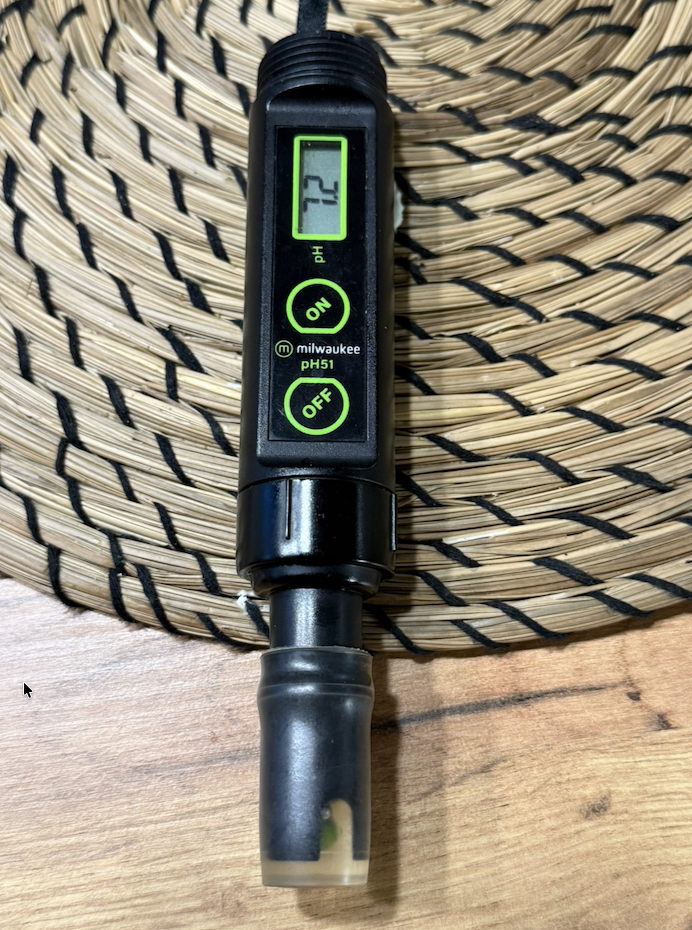
A month ago, I was genuinely excited about this. I took a photo of a pH meter with my phone, gave the image to ChatGPT and asked: “How do I use this?” The AI identified the device, explained the buttons and showed me how to use it. Pretty impressive, right? At the time, I wrote about it as an example of how far the practical use of AI had already come.
Now, about a month later, it already feels old-fashioned.
Not because image recognition or creating instructions for using a device has become useless. But because I have already moved three steps beyond that myself. First, I asked AI for advice and did the work myself. Next, I asked AI to build a complete program for me. Now I give it the entire task.
And this is where things become genuinely interesting.
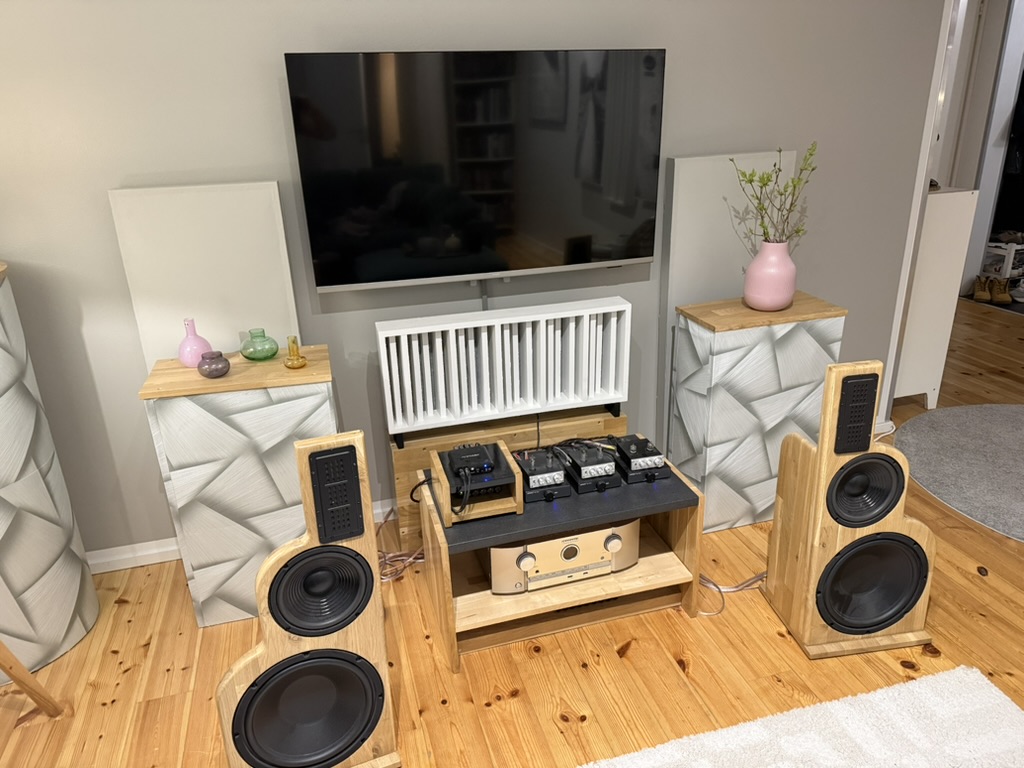
My living room currently contains a small hi-fi studio
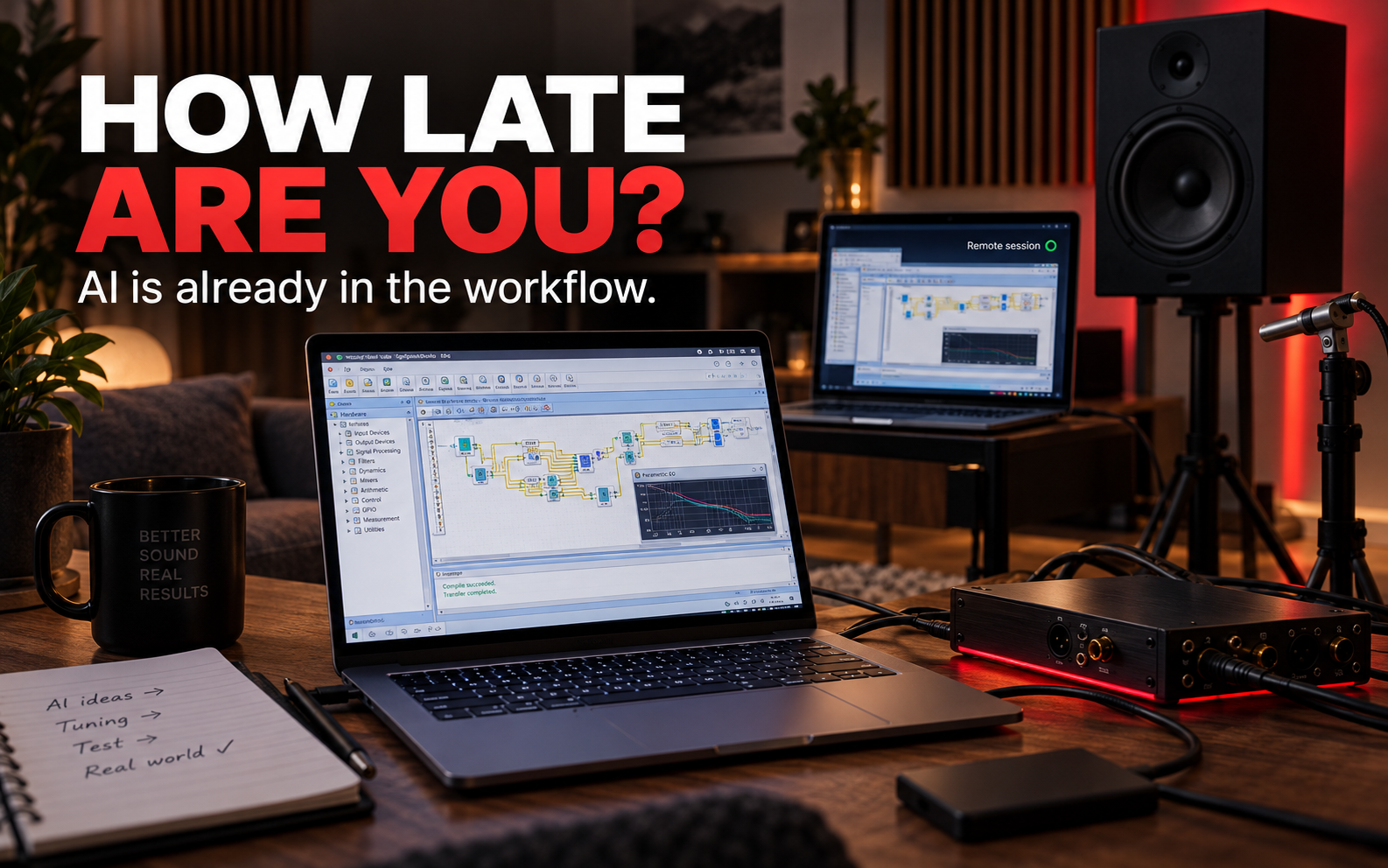
I build hi-fi equipment in my spare time, and right now I am working on a pair of three-way active dipole speakers. A speaker is standing in the middle of the living room, surrounded by a measurement microphone, amplifiers, cables and a DSP box that handles the crossovers, delays, corrections and other signal processing between the drivers. The DSP is programmed with SigmaStudio.
There is just one small practical problem. I use a Mac, but SigmaStudio only runs on Windows. I solved this by digging out an old Intel MacBook Air, installing Windows on it and physically connecting it to the DSP hardware. My new Mac, in turn, controls that Windows machine lying on the floor through a remote connection.
Up to this point, this is still perfectly normal geeky hobby stuff.
Then ChatGPT Work and Codex entered the picture.
Three steps in just a few months
The first way I used AI was the familiar one: I asked, it answered, and I did the work. If something did not work, I took a photo, asked again and tried the next option. Even this accelerated the work enormously.
At the next stage, I asked myself a fairly simple question: why should I ask AI to tell me how to build the program? Why not ask it to build the program? I define the architecture, crossover frequencies, filters, PEQs, gains and the other functionality I want. The AI builds the whole thing and gives me a finished program.
For a while, even that felt quite advanced.
Then I realised that even there, I was still an unnecessary middleman.
Give it the objective. Not the task step.
This is the point where my own understanding of AI changed the most.
Work no longer just sits somewhere in the cloud telling me what I should do. It can work on my computer. That alone is a huge leap: AI no longer merely advises a human on how to use a computer. It can physically perform the actual work on the computer itself.
But in my case, the chain goes even further. Work operates on my Mac and uses the remote connection built into it to control another computer lying on my living-room floor. On the Windows machine, it uses SigmaStudio, builds the DSP program, makes changes and tests them. And the chain does not even end at that computer: at the other end of a USB cable sits a physical DSP box.
In practice, Codex is already inside my stereo system.
It builds the program, loads it onto the DSP, reads any errors, fixes them, writes a new version and tests again. I can sit beside it and watch the screen change as the work progresses.
AI is no longer, for me, a black box running somewhere in the cloud that I type questions to in a browser text field. It is on my Mac. It uses the Windows computer on my floor. It communicates with SigmaStudio. And at the end of the chain, it programs physical electronics through which my living-room speakers operate.
AI is no longer only online. It has entered the living room.
And to me, this is a far bigger change than a new chatbot version or a slightly better text generator.
At the same time, companies are still wondering whether they should try ChatGPT
My rough estimate is that around 80% of business decision-makers still have not properly understood what has happened during the past year. And an even smaller share understand how dramatically the pace of development has accelerated in just the last few months.
In the business world, people are still discussing whether documents may be given to ChatGPT. Should employees receive prompt training? Could it perhaps help write emails a little faster? Should we now create an AI policy and establish a working group to investigate the matter?
Meanwhile, I am sitting in my living room on a Sunday watching AI use two computers, build software, communicate with a physical DSP device and take the entire task towards a finished result.
That is quite a gap.
Dinosaurs in the business world have one defining characteristic: they call slowness deliberation.
And if someone is offended by the word dinosaur, I think that is beside the point in this discussion. Technology is not going to slow down while everyone waits to feel comfortable.
“Let’s wait six months” may not mean six months
At least to my eyes, AI development does not currently look linear. New capabilities are built on top of previous ones, combined with each other, and suddenly something that felt advanced a month ago looks primitive today.
A month ago, I took a photo of a device and asked AI how to use it.
Now I give AI the objective, and it goes to the device itself.
If development continues in the same direction, “let’s wait a few more months” does not necessarily mean that you are only a few months behind. In terms of working methods, the gap can grow into years during that time. That is why I sometimes deliberately exaggerate by saying that some companies are already a couple of years late — and soon it will be ten.
Not on the calendar.
In capability.
This is not really an article about DSP
The DSP just happened to be the test subject this time.
The much more interesting question is what this means for companies. For a long time, we have asked: “How could AI help with this task step?” I think that question is already too small.
A better question is: “Why is a human still doing this task step at all?”
And then comes an even more interesting question:
Why give AI a task step when we can give it the objective?
At that point, we are no longer talking about using ChatGPT. We are talking about processes, organisations, leadership, productivity and competitiveness. We are talking about which parts of the work should be done by people and which can be assigned to a system capable of planning, executing, reviewing and correcting its own work.
This is what I believe companies should be discussing right now. Not next year. Not when AI is “ready”.
It will never be ready.
Tomorrow, it will be able to do more again.
The future is not coming. Right now, it is running on a Windows computer on my living-room floor.
And soon, even that will already be old-fashioned.
CRM is one of the most important tools in business and sales. A brand-new tiny company needs one just as much as an old, large one. But what kind of CRM is best for a new company or a first-time entrepreneur?
There are CRM systems coming out of your ears: free and expensive, huge and tiny, and every flavour in between.
But especially for a small, entrepreneur-led company, what is the best CRM?
The one that actually gets used.
One that is easy, clear and fit for purpose.
No extra bells, whistles or other pointless fluff. The harder it is to use, the less it gets used.
The most important thing when choosing a CRM is to stop choosing a CRM. At least for starters. Turn the whole thing around: first analyse what I actually need the CRM for. What do I want to put in it? What do I want to see when I open it? In what format? Which data?
There is your CRM skeleton – and absolutely nothing else. Every extra gizmo bolted around it is pointless: it slows things down, gets in the way and ultimately makes people use the CRM less.
Many off-the-shelf CRMs try to be as versatile as possible, cover every imaginable need and provide a growth platform – for absolutely everything? That is why adopting almost any CRM package usually begins with two steps:
1. Strip away everything extra and unnecessary.
2. Adapt ourselves to the way the remaining skeleton works.
Both are daft. Especially number two: while the basic idea is the same in every CRM, each one still works slightly differently. A small entrepreneur-led company usually has a very strong way of working of its own: what I sell, how I sell it and how I want to track it. It works. So why should it be forced into some CRM process diagram carved in stone?
Why not simply build the CRM around the company’s own process – the one that already works best?
It´s doable.
I analysed the options and ended up with three different models:
1. A completely ready-made CRM, such as HubSpot or Pipedrive. Remove 70% and adapt our own way of working to whatever remains.
2. Build our own from scratch with Codex?
3. Hybrid model: choose an existing platform that is flexible enough, then use the working technology underneath to build our own CRM “from scratch” on top – containing only the functions I will actually use.
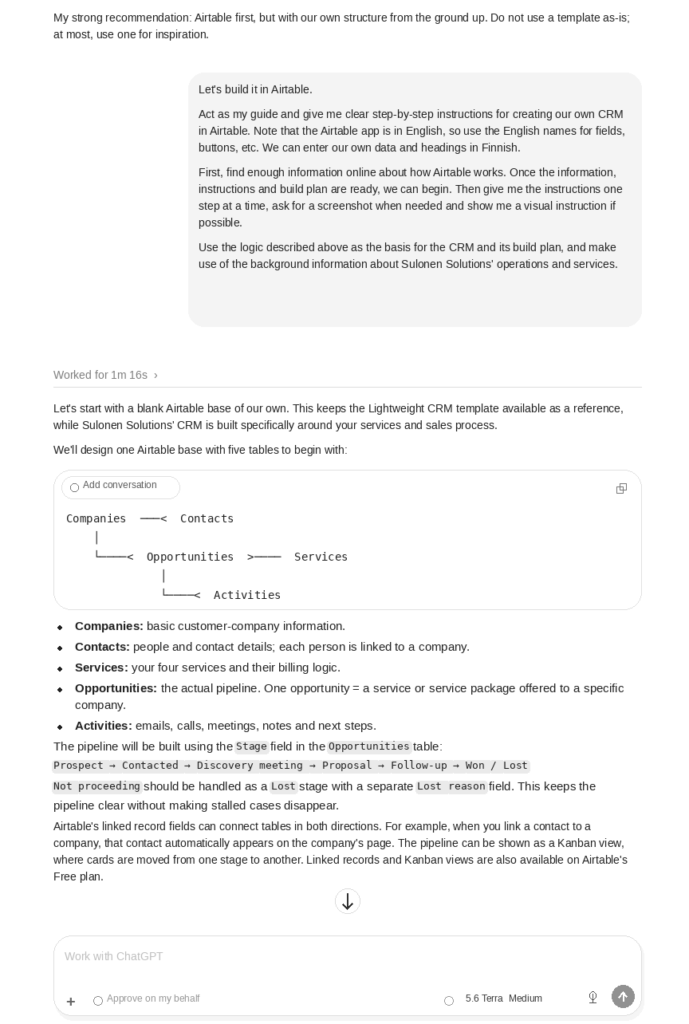
I went with option 3, and Airtable got the job. It is a browser-based cloud service: essentially an interface built on top of Excel-style tables, which can be used to generate different CRM systems – or pretty much any other tracking tool. Under the Sales/Marketing section, I found several ready-made CRM templates, each with a slightly different flavour.
And then I found the awe-inspiring button: “Create new +“. Click it and – surprise – a blank canvas opens. Then you start slapping this and that onto it with a very large paintbrush.
There is, however, an easier way: use AI and ChatGPT’s capabilities:
– Create a project in the Work environment
– Tell it which features I want in the CRM and which I do not (a precise list = a better result!)
– Ask the Terra or Sol engine to produce a plan based on my requirements
– Once I have approved the plan, ask the AI to guide me step by step through building the new CRM on Airtable
That is what this story is about.
We started after morning coffee, at around nine, like this:
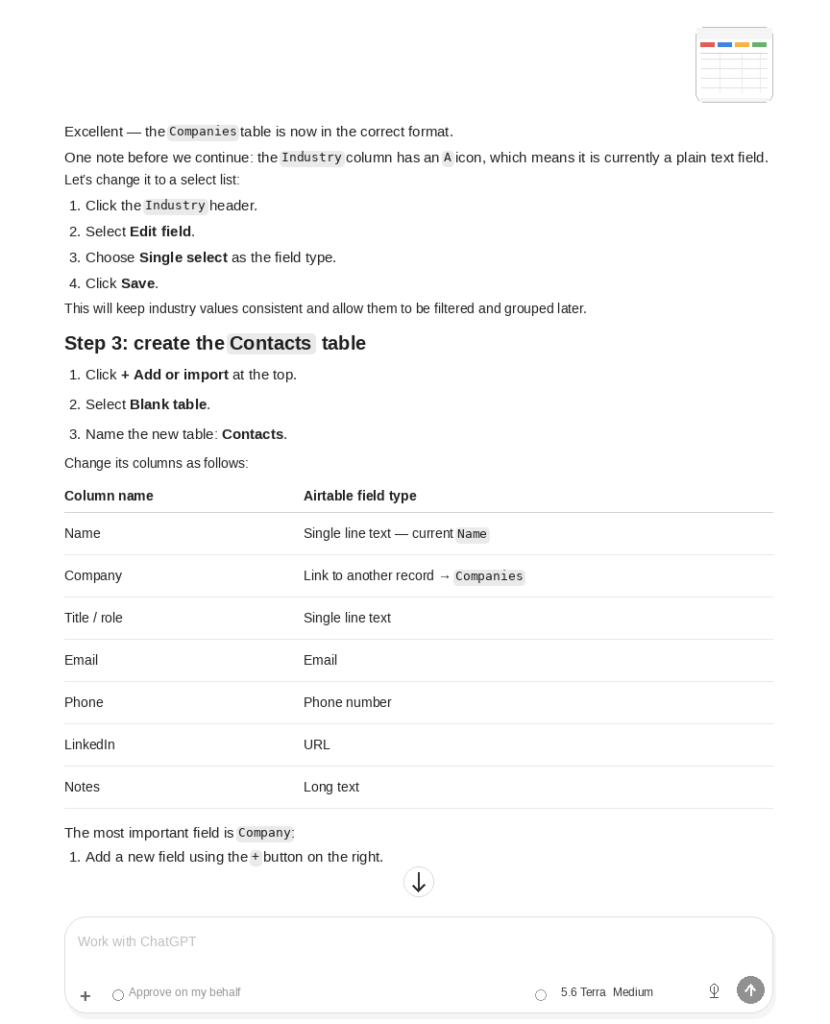
I tend to use screenshots in these projects -> ChatGPT can see what I have done on my screen and guide me when needed, as in the next example:
By 2:30 p.m., it was done. I also told ChatGPT to create a user guide for the CRM, lay it out on Sulonen Solutions’ official Word template, and save it in a specific folder on my Mac.
In between, I had already managed to go cycling, visit the library and stop at the supermarket on the way. Now it is done.
From chat on your phone to the Work workspace, from Luna to Sol, and from everyday questions to complete AI workflows.
Sulonen Solutions | 1 August 2026 | An up-to-date overview
The ChatGPT mobile app and the desktop app for Mac.
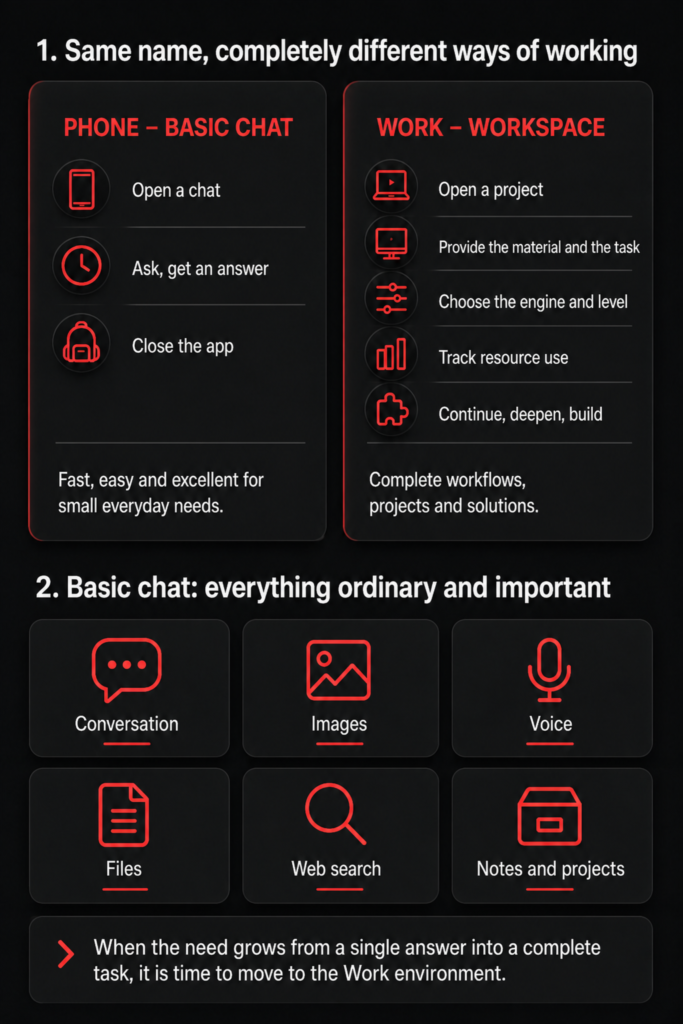
I opened the same ChatGPT in two places – and got two very different machines
I opened ChatGPT on my phone. The screen showed the familiar blank conversation and one simple question: “How can I help?”
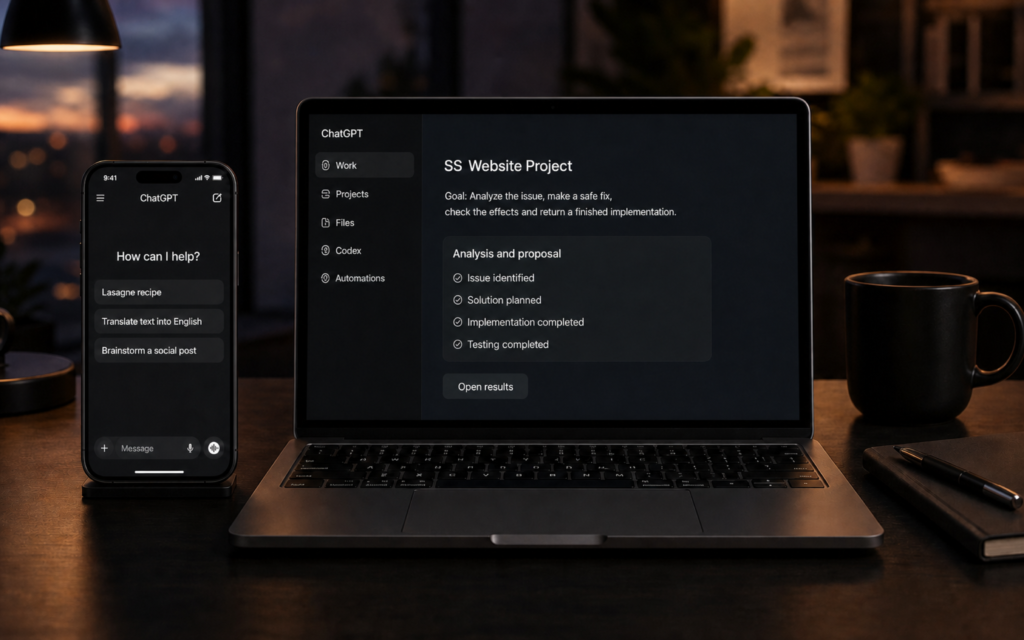
I opened the same service on my Mac in the desktop app (a local app, not through a browser). I was met by Chat, Work, Projects, Files, Codex, Automations, local folders, tools and several different engines. Same logo, same user account – but a desktop of an entirely different scale. And most importantly: the desktop app can be given access to folders on your computer. It can read material from your machine, produce finished documents, presentations and PDFs – and save them directly to the folder you want.
So was one the ordinary ChatGPT and the other an entirely different product?
No. And yes.
ChatGPT is no longer a single chat window. It is a family of tools that brings conversation, project context, files, web search, agent work, automation and software development together under the same name. In the current offering, OpenAI itself distinguishes three main experiences: Chat for questions and discussion, Work for research and producing finished deliverables, and Codex for software development. [1]
It is worth understanding this distinction before comparing models, tokens or credits. Otherwise, it is easy to try to solve the wrong problem with a tool – and then wonder why the work was slow, expensive or confusing.
1. Basic Chat has not gone anywhere
Ordinary Chat is still the familiar ChatGPT. You ask it questions, think with it, show it an image, give it a file and refine text with it round by round.
It is especially well suited to situations in which the work is still about thinking rather than execution:
questions and quick investigations
brainstorming and challenging alternatives
writing and editing texts
interpreting and generating images
web search
voice conversations
defining a task before the actual Work run
Basic Chat is light precisely because the user does not need to turn it into a project. Open a conversation, ask, assess the answer and continue.
Think in Chat. Execute in Work. Develop software in Codex.
The boundaries are not concrete walls. You can write code in Chat and ask a single question in Work. But when the way a tool is used matches the nature of the task, the outcome improves too.
Figure 1. The same ChatGPT name – two different ways of working.
2. Is Chat in the desktop app the same as Chat in the browser?
In practice, yes – but the operating environment is not the same.
Ordinary Chat in the new ChatGPT desktop app is the same Chat experience belonging to the same user account and cloud service. Chat conversations sync between the browser and the desktop app. The desktop app therefore does not contain a separate “second ChatGPT brain” that lives inside your Mac or Windows computer. [1]
The difference comes from the shell, permissions and tools connected around it.
The browser version is an easy general-purpose interface. It works without installation, and you can use Chat, projects and, depending on your account, Work and connected services there. The desktop app brings Chat, Work and a separate Codex view together in one application. In addition, with the user’s permission, Work can handle local files and desktop applications. [1][2]
The desktop app also has a built-in browser for Work and Codex tasks. The user and ChatGPT can view the same page, navigate tabs, download files and wait for the user to sign in to a service. The browser has its own browser session; it does not automatically use the sign-ins or cookies of ordinary Chrome. [3]
So the precise answer is this:
Chat in the desktop app is the same ChatGPT conversation. The desktop app as a whole, however, is a much broader working environment than a browser window.
3. Work is not just a longer ordinary chat
In ordinary Chat, I often ask for an answer. In Work, I give an objective.
The difference sounds small, but in practice it changes the entire structure of the work.
A Chat question could be:
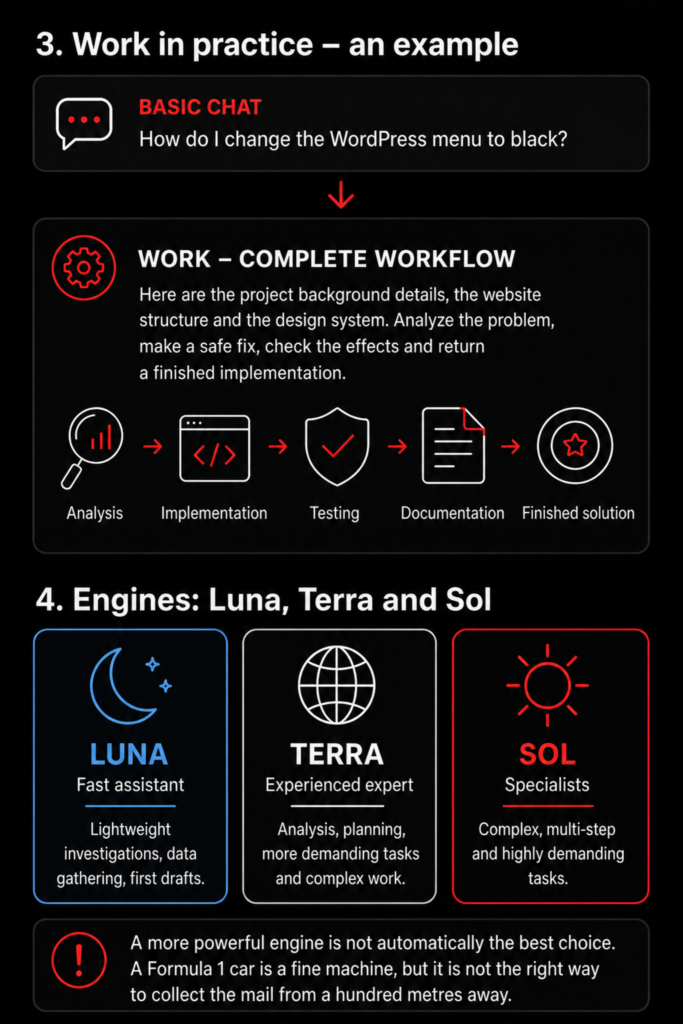
“How do I change a WordPress mobile menu background to black?”
A Work task could be:
“Here are the site structure, the theme in use, the design system and the required files. Identify the structure causing the problem, make the smallest safe change possible, check its effect on desktop and mobile, document the change and return a finished implementation.”
The first asks for instructions. The second gives work.
OpenAI describes Work as an agent that gathers context, plans the approach and works across files, applications and tools to produce finished documents, spreadsheets, presentations, reports and websites. Work conversations done in the cloud can continue between the browser, mobile and desktop app. Local work tasks, in turn, may remain only on that particular computer. [1][4]
Work’s strength is not that it automatically writes a better individual paragraph. Its strength is the workflow:
gathering material
structuring the task
analysis
implementation
review
corrections
documentation
a finished file or other outcome
When a task grows from an individual answer into a complete piece of work, it is time to move to Work.
4. Luna, Terra and Sol are not three reasoning levels
At this point, the interface can easily start to look more like a space programme than a writing assistant.
The engine and the reasoning level are two separate controls.
In the GPT-5.6 family, Luna is the fastest and most affordable model, Terra is the balanced general-purpose model, and Sol is the flagship model for the most demanding tasks. In Work and Codex, Plus, Pro, Business and Enterprise users can, depending on their account and the rollout stage, choose between these three and separately set the reasoning level for the task. In ordinary Chat, Terra and Luna cannot be selected; GPT-5.6 Sol operates behind the reasoning options there, while GPT-5.5 Instant serves as the fast everyday default model. [5][6]
This is why the formula “Luna = fast, Terra = medium and Sol = high” should not be taken literally. It is a useful first rule of thumb, but technically the choice is two-dimensional:
How capable and expensive an engine does the task require?
How much time and computation is it worth using for this particular task?
Sol can be set to do a light run. In some environments, Luna can be given more time to reason. The most powerful combination is not automatically the best combination.
A Formula 1 car is a fine machine. Even so, it is not the right vehicle for fetching the post from a hundred metres away.
Figure 2. A Work task and the practical division of labour among GPT-5.6 engines.
5. What should you actually do with Luna, Terra and Sol?
There is no perfect boundary, because a task’s difficulty is not visible from its length. One short question can contain a difficult contradiction. An inventory of a hundred files, in turn, can be lengthy but mechanical work.
The following is a practical division of labour.
Luna – the fast assistant
Luna is suited to tasks where the structure of the work is clear and the cost of error is low:
file lists and material inventories
classification, extraction and organisation
summarising provided text
format conversion and mechanical cleanup
first drafts
repeated checks for which the rules are precisely defined
Terra – the experienced general-purpose model
Terra is the sensible default for most Work tasks:
analysis of several sources
plans and comparisons
ordinary expert reports
multi-step but scoped implementation
a technical review of a website or document package
building a finished draft from provided material
Sol – special forces
Sol is worth using when the task involves genuinely difficult inference or a high cost of correction:
unclear and contradictory source information
difficult root-cause analysis
a whole spanning several systems or files
technical solutions that change the architecture
a critical final audit
a situation in which the wrong solution creates a great deal of new work
Sol does not remove the need for review. It simply earns its place when a task genuinely needs its persistence and ability to manage complex wholes.
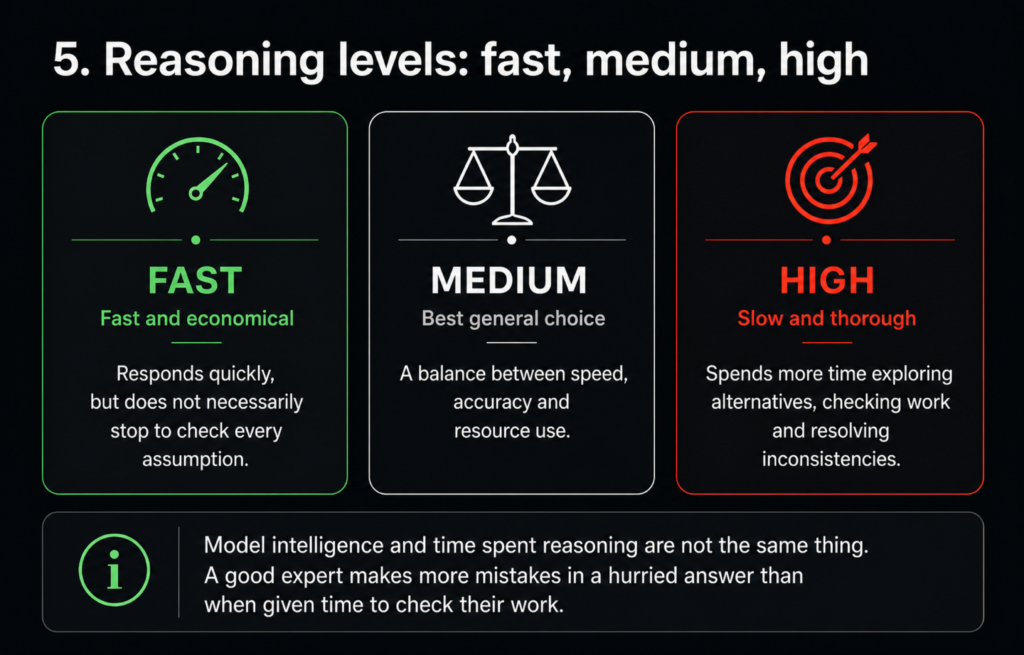
6. Reasoning level indicates time spent working – not intelligence alone
Current ChatGPT distinguishes fast responses and deeper reasoning more visibly than before. In ordinary Chat, the choices appear, for example, as Instant, Medium, High and, on some accounts, Extra High or Pro levels. OpenAI describes Medium as more considered than usual, and High as longer reasoning for complex, multi-step tasks. [7]
A fast level is suitable when the task is clear and the answer is easy to verify.
The medium level is a good default for expert work.
The high level should be reserved for situations where the model needs to:
compare several alternatives
identify contradictions
check its own work
solve a multi-step problem
take many constraints into account simultaneously
High reasoning is not magic dust. A poorly scoped task remains poorly scoped even if it is thought about for three times longer.
Let us take a practical example at this point:
Think of an essay written at comprehensive school. The lightweight Luna engine is like a basic-level essay writer. It will produce something finished, but not necessarily the top result in the class. The Sol engine, by contrast, is the class’s most innovative pupil with a broad knowledge base, who writes a first-rate and insightful essay by combining a great deal of knowledge learned over the year.
The reasoning level (Fast – Medium – Heavy), on the other hand, means the time that the same writer (engine) spends on the work. With fast (but light) reasoning, even the best writer in the class may make mistakes in their essay; some illogicality goes unnoticed, there is a typo somewhere… But the result was finished quickly. The heaviest reasoning model, in turn, means that the writer does not stop when the essay is complete – they read it through, check it again, read it a third time – by this stage a few errors have already been found and corrected. The finished essay is submitted only after it has been read through, corrected and fine-tuned many times.
Every AI engine does this same thing. At the highest reasoning level, AI does not quickly hand in unfinished work. Especially with the SOL model, you can see how it “stress-tests” its answer, turns it every which way, checks, compares, corrects, reads again and checks once more.
A model does not always need more time. First, it needs a better task.
Figure 3. The model and the reasoning level are two separate choices.
7. What consumes tokens – and what does not?
A token is a technical unit for processing text. A word can consist of one or more tokens, and punctuation, spaces and parts of words also affect the count. The model processes input tokens and produces its answer as new tokens. Some reasoning models also involve internal reasoning tokens. [8]
Tokens are used when the model processes content:
the request you write
relevant conversation history brought into the task
project instructions and other context
file content given for the model to read
text retrieved from a browser or connected services
the answer produced by the model
internal reasoning in some models
Simply opening the application, reading an old answer or browsing the conversation history is not a new model run. When you ask the model to read, assess, search for or produce something, resources begin to be used.
Images, audio, computer use and other tools also do not always turn directly into ordinary text tokens. They may have their own usage meters, tool calls or consumption that affects the shared agent allowance.
A long conversation does not automatically mean that the entire chain is billed word for word again on every turn. The system may use retrieval, summarisation and caching. Still, the general rule holds: the more relevant background the model has to read on every turn, the larger the input becomes. In API use, tokens read from cache are cheaper than new input, but they are not the same as zero consumption. [8]
8. Token, usage limit and credit are three different things
These are easily confused because the interface usually shows the user usage limits and credits – not the exact token count for an individual response.
A token is a technical unit of measurement.
A usage limit is the permitted amount of messages, reasoning or agent work included in a subscription during a given period.
A credit is a paid or administrative consumption unit that supports specific features after the subscription’s included usage or in an organisation’s shared consumption model.
A ChatGPT subscription and the OpenAI API are different products. In the API, usage is priced directly on the basis of the tokens processed by the model and tool calls. With an ordinary ChatGPT subscription, the user primarily operates within subscription-specific usage limits.
On Plus and Pro accounts, Codex, Work and, for example, ChatGPT for Excel may, depending on the account and feature rollout, use the same agent-work allowance. When included usage runs out, supported features may use purchased credits. OpenAI stresses that the available options are always shown on the account’s own Usage page, because feature availability changes as rollouts progress. [9]
This leads to a practical guideline:
Do not optimise only the token. Optimise the finished work.
The cheapest model is not cheap if the task has to be done three times. The most expensive model is not efficient if it spends fifteen minutes thinking about something Luna could have organised in two minutes.
9. This is how work should be broken down
A good Work task is not a huge wish. It is a managed work package.
A working rhythm looks like this:
1. Define the objective in Chat
First discuss what is actually being done. Define the outcome, risks, material and acceptance criteria. (This does not usually consume usage limits -> check your own subscription.) I often do the planning for an entire project from start to finish in Chat. We plan, assess, invent and reflect. Only when there is a need to produce a concrete finished document or programme, or to analyse a huge number of files and emails and return a report from them, do we have the Work environment do it, for example with Luna or Terra. I use Chat’s help for this too: I ask it to create a finished “prompt”, in other words a precise instruction for the Work agent. Chat can summarise our discussion up to that point and turn it into a strict instruction for the Work agent, so that it does not start improvising or doing unnecessary work.
2. Keep the material compact
Give Work only the necessary files and permanent project instructions. A hundred-page backstory does not help if the task concerns one CSS setting.
3. Start with an inventory
Luna can inventory the material, identify files and make the first classification. At this stage, do not fix everything yet. If you want to form an overall picture of material containing numerous emails, several folders of files and 30–40 individual documents, it is not worth immediately putting the whole mass through a SOL agent at the highest reasoning level. You can do it, but your Plus subscription’s weekly allowance will be full already… I tell Luna to read it through at the medium or high reasoning level and only produce a list of the materials, not an analysis yet. When you tell Luna this objective right at the start in the prompt, it does not analyse yet but only creates a finished “source list” in a form that Terra can easily continue from. Terra can then directly disregard 70% of the material that is not relevant and analyse only what matters.
4. Execute with Terra
Terra is suited to ordinary analysis, planning and scoped implementation. Ask for one clear delivery: for example, a corrected file, a finished article or a review report. Or ask for an analysis of the entire source material that you just “cleaned up” with Luna – saving tokens.
5. Escalate only the difficult part to Sol
When you encounter a contradiction, an unclear root cause or a broad chain of effects, move that specific problem to Sol. Do not move the whole project automatically. I often use SOL only after I have received a finished analysis, report or material from Terra. At that point, you can do the final stress test with SOL.
6. Separate implementation and review
Finally, request a separate review against the acceptance criteria. In critical work, the reviewer can be a separate run or a more capable model.
7. End the chain in a controlled way
Ask for a short summary: what was done, which files were changed, what remains open and what the next step is. When the objective or component changes, start a new chain. It is also good to switch chains regularly if the conversation has become long and already contains 50–100 questions and answers. If you make Chat “tow along” the context of the whole conversation, it slows down. In that case, ask it to create a “transfer package” and say that you are moving to a new chain. Chat can create, for example, a compact PDF or .md file that you can copy to the new chain and continue where you left off – but without the old burden.
One outcome. One responsibility. One checklist.
10. Codex is more than a chat that can write code
You can ask Chat for a snippet of code. Codex is used when the code needs to change in a real project.
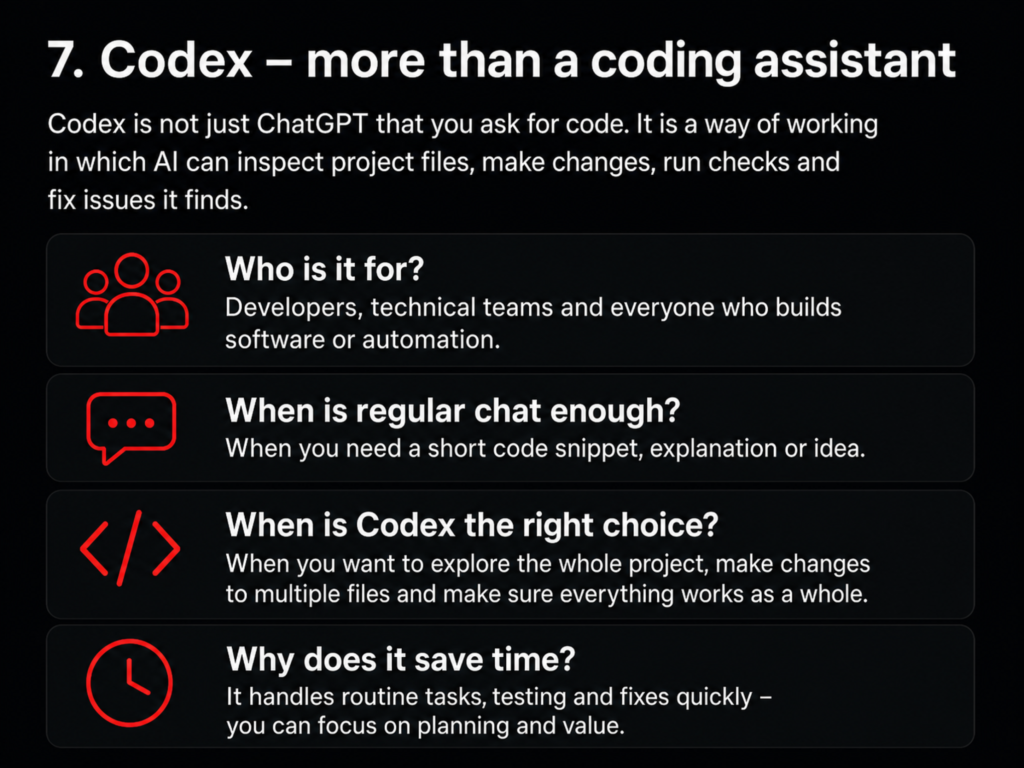
Codex is a working environment that can use local folders, software repositories, the terminal and developer tools. It can make changes, run tests and commands, inspect differences, and go through the structure of a software project. Its history and work view are separate from ordinary ChatGPT history, and Codex is not selectable as an ordinary web or mobile view. [1][10]
When is ordinary Chat enough?
When you need a short code example, an explanation, an idea or an interpretation of a single error message.
When is Codex the right choice?
When you want to examine an entire project, make changes to several files, run tests, check dependencies and ensure that the whole still works after the change.
Codex saves time because the user does not need to transfer every file, error message and fix manually through a conversation window. It sees the worksite – not just one detached screw.
Figure 4. Codex is a project workspace, not merely a conversation that answers with code.
Summary: the right tool matters more than the biggest model
ChatGPT is not one window. It is a family of tools.
Chat is conversation, thinking and quick help. Work is a goal-oriented workflow that gathers material and produces a finished outcome. Codex is the desktop for software work, where changes can be made, tested and reviewed in a real project.
Luna is suited to light and well-defined tasks. Terra is a strong default for ordinary expert work. Sol is worth using when difficulty, uncertainty or the cost of error genuinely calls for it.
Reasoning level is not the same thing as the model name. A token is not the same thing as a credit. The desktop app is not a different ChatGPT – but it opens a considerably larger toolset for the same ChatGPT.
The best model is not always the most efficient model.
The best model is the lightest model that completes the work reliably.
AI adoption in companies often stalls before the first experiment has even begun. The discussion starts with risks, systems and strategies, even though a far more useful question would be much simpler: what is one real problem we could solve better today?
Some time ago, one company decided it was time to enter the age of AI.
In practice, this meant that the management team began debating whether AI was safe to use.
What could it actually do?
Could it read an incoming purchase invoice from a scanning service?
Could it identify the reference number, amount and due date?
What if it read one digit incorrectly?
The questions were entirely valid. In financial administration, a system that is almost right is not much use.
But there was also something very human about the discussion.
Before AI had processed a single invoice, it was already being assessed as though it were applying for the role of chief financial officer.
“A computer will never match a human”
One employee following the discussion laughed at the whole idea.
“Artificial intelligence? Exactly. Artificial stupidity. A computer will never match a human.”
From their own perspective, they had evidence to support the claim.
Over the years, a highly advanced information management system had developed around their workstation.
There were an estimated 78 kilograms of printed paper on the desk: stacks, binders, plastic sleeves and loose documents wedged between them.
The remaining 42 kilograms had been arranged on the floor around the chair in stacks of precisely calculated height.
The semicircular archive had been designed ergonomically.
When the user swivelled their chair to the correct angle, they could usually reach the desired stack of papers in under a minute.
The system was completely independent of an internet connection.
It had no licence fees.
It required no software updates.
From a cybersecurity perspective, it was difficult to hack remotely.
And no AI had yet managed to move the wrong stack of papers by accident.
On closer inspection, it was therefore a remarkably reliable solution.
Its only weaknesses were search, backups, information sharing, version control, fire safety, and the fact that the entire user interface was stored inside one person’s head.
This is not a question of humans versus machines
When discussing AI, the debate is easily framed in the wrong way.
Can a computer match a human?
Can AI do the same job as an experienced employee?
Which one is better?
In most companies, this is not the first question that needs to be answered.
A far more useful question would be:
In which task is a person currently spending time on something a machine could do quickly – and that a person could verify even faster?
Reading a purchase invoice reference number is a good example.
The task does not require AI to have deep business understanding, ethical judgement or decades of experience.
It needs to recognise a sequence of numbers.
And because recognition can fail, the result is checked or validated against existing rules.
AI does not need to be perfect.
It needs to be good enough at the specific stage of work where it is used, and the process must identify when a human needs to step in.
This is a far more realistic starting point than asking whether AI can replace a person.
Meanwhile, elsewhere
While one room is debating whether AI can safely be trusted to read a single reference number, another working environment has already been transformed completely.
When building a website, a person takes a screenshot after almost every step.
AI examines the image and identifies:
which change worked
which element moved to the wrong place
which setting should be changed next
which browser tab is already open
which tool will probably be needed in the next step
The image shows that the web hosting control panel is open in the third browser tab from the left.
It will be needed next to embed a custom-built booking module into the website.
The person does not first need to explain the entire working environment again.
AI reads the situation from the image and continues from where the work actually stands.
This is no longer just about producing text.
It is about interpreting the situation, anticipating the next step and continuously supporting a human-led project.
AI can also help prepare for human situations
The most visible uses of technology often involve documents, images, calculations and code.
A less visible but equally interesting application is preparing for communication and interaction.
When people work together for long enough, recurring patterns begin to emerge in the way they communicate.
One person wants a direct answer.
Another needs background and reasoning.
A third reacts strongly if something is presented as too final.
A fourth will not respond to a long message at all, but will answer three clear questions.
Based on previous communication, AI can help structure these differences and shape a message to suit the recipient better.
Not to manipulate the person, but to reduce situations where even a good idea fails because it was presented in the wrong way.
The same applies to preparing for meetings.
Before an important discussion, it is possible to consider:
the most likely objections
where the participants’ objectives differ
which questions are likely to be asked
the three different ways the discussion might develop
how to respond in each situation
AI cannot predict human behaviour with certainty.
It helps people prepare for more than one possible course of events.
In leadership, that is a significant difference.
A poorly prepared person reacts to what happens in the meeting.
A well-prepared person has already considered what might happen.
This is also where boundaries are needed
Using AI in communication and personnel matters requires judgement.
Not all material should be entered into just any service.
Personal data, confidential messages, contracts and trade secrets require suitable business tools, access controls and clear rules.
That is not a reason to avoid examining the subject altogether.
It is a reason to design the use properly.
Companies do not ban email simply because confidential information can be sent to the wrong recipient.
Instead, they create instructions, permissions and responsibilities.
AI requires the same adult approach.
No naive enthusiasm.
But also no blanket ban on everything new, just in case.
A grand AI strategy can be an excellent way to do nothing
In many companies, AI adoption begins with exceptional ambition.
They decide to prepare:
an AI strategy for the entire group
a comprehensive risk assessment
a complete technology architecture
a training programme for the entire workforce
a list of approved use cases
a multi-year implementation roadmap
All of these may become necessary later.
But if the first practical experiment is postponed by six months, strategy work can become a sophisticated mechanism for delay.
AI is discussed extensively.
New boxes appear on presentation slides.
A steering group is established.
One member of the management team attends a seminar.
And the same employee continues copying information from one system to another every morning.
The company does not first need a perfect description of everything AI might someday do.
It needs one controlled experience of what AI can do now.
Start with a task whose result a person can verify
A good first experiment is small, repetitive and sufficiently safe.
It could be, for example:
extracting data from purchase invoices
creating the first draft of meeting minutes
summarising a long report
grouping customer feedback
comparing information in an offer against requirements
finding an internal instruction within a large collection of documents
preparing for a sales meeting
creating the first version of website copy
prototyping a simple tool
In a good pilot:
the task occurs often enough
it clearly consumes time
the source material is available
the result can be checked
an error will not cause uncontrolled damage
the benefit can be measured with a simple metric
The first experiment does not need to prove that AI will transform the entire company.
It only needs to answer one question:
Is this worth continuing?
Measure ordinary things
The success of an AI pilot does not need to be measured with a complex AI index.
You can ask:
how much time was saved
whether manual work decreased
whether information became easier to find
whether people had more time for evaluation
whether fewer errors occurred
whether the work genuinely became easier
whether the result was good enough for continued use
If processing a purchase invoice used to take three minutes and now takes one, the benefit can be calculated.
If preparing for an important meeting previously produced one plan and now produces three realistic scenarios, the benefit is visible in decision-making.
If a small technical website change previously required an external developer and can now be completed under supervision in fifteen minutes, the impact is visible in speed and cost.
Not all value needs to be described in futuristic terms.
Sometimes the best business benefit of AI is simply that ordinary work runs a little better every day.
Experimenting does not mean losing control
Corporate caution is understandable.
Mistakes happen.
Information can leak.
AI can produce convincing-sounding nonsense.
But people also misread reference numbers, save files in the wrong folders, forget meeting decisions and make choices based on incomplete information.
The goal is not to replace human imperfection with a perfect machine.
No such machine exists.
The goal is to build a process in which the strengths of people and technology complement one another.
AI processes large volumes of information quickly, identifies patterns and generates alternatives.
A person understands the situation, assesses the consequences, makes the decision and takes responsibility.
Perhaps the greatest risk is not an incorrect reference number
Companies should consider what happens if AI reads one piece of information incorrectly.
But an equally important question is:
What happens if we never learn to use it at all?
In that case, a competitor processes the same information faster.
Another company builds a service while your own organisation is still discussing it in a working group.
One employee multiplies their productivity while another continues searching through piles of paper.
No technology removes the value of good work, experience or judgement.
But history offers very few examples where systematically resisting a more effective tool became a long-term competitive advantage.
Start with the problem
The first AI project does not need to be impressive.
It does not need to transform the entire organisation.
It does not even need to be visible to the customer.
Choose one real problem.
Define the scope of the task.
Define what success means.
Protect the data.
Keep a person involved in checking the results.
Experiment.
Measure.
Then decide what should be done next with what you have learned.
A company does not enter the age of AI when the letters AI are added to a management presentation.
It enters the age of AI when the first real problem is solved in a new way.
AI has become part of all kinds of situations: from counting aquarium fish to designing a hi-fi system, from calibrating a pH meter to building a company website. The biggest change is not any single trick, but the way I now approach problems.
AI did not enter my life as one great revolution.
It first arrived through small questions.
Could you compare these options?
What does this measurement result mean?
How should this be built?
Can you identify this device from the picture?
Then the questions began to change.
I was no longer asking only for information. I began asking AI to interpret images, assess videos, understand technical systems, design solutions and build them with me.
At some point, I realised that ChatGPT was no longer merely a more versatile search engine for me.
It had become a thinking partner.
The same tool, completely different problems
When people talk about AI, the discussion easily focuses on big themes.
We talk about disappearing jobs, automation, major IT projects and innovations that transform entire industries.
These are important topics, but based on my own experience, the impact of AI appears somewhere entirely different, at least at first.
It appears in small moments.
In situations where I would previously have searched for a manual, browsed discussion forums, called someone more knowledgeable or postponed the whole matter.
Now I can take a picture, describe the problem and start working it out immediately.
A pH meter in the morning
One morning, I had an aquarium pH meter in front of me.
It had recently been reading slightly too high, so I had cleaned the sensor, kept it in storage solution and finally placed it in a pH 7.0 calibration solution.
The device still needed to be calibrated.
The problem was small but practical: where was the adjustment made?
I took a picture of the meter and sent it to ChatGPT.
From the image, the device was identified as a Milwaukee pH51 meter. A second image revealed two adjustment screws and markings that referred to the pH 7 and pH 4 calibration points.
I could continue without searching for manuals or comparing different model versions.
AI did not, of course, calibrate the meter for me. I prepared the device, made the adjustment and checked the result.
But AI quickly brought me to a point where I knew what I was doing.
Moments like these have changed the way I solve problems.
Previously, my first question might have been:
Where can I find the manual for this?
Now it is often:
What can we infer from this image?
Counting aquarium fish from a video
Breeding aquarium fish presents problems that may not have a ready-made manual.
One of them is estimating the number of fry.
When a tank contains a large number of small angelfish fry, counting them by eye is difficult. The fish move, swim behind one another and constantly change position.
A single image can provide a rough idea, but a video reveals more.
Using video, we have estimated the number of fry, examined their movement and feeding behaviour, and followed the development of their colouring.
AI’s estimate in a situation like this is not an absolute truth. Counting moving fish always involves uncertainty.
Even so, it can provide a much better starting point than a quick visual guess.
More importantly, the video can be examined from several perspectives:
approximately how many fry are in the tank
whether they are distributed evenly
whether they appear to be feeding actively
whether there are visible differences in size
how their colouring and fins are developing
when the available space is beginning to become too small
AI does not replace the breeder’s experience.
It helps direct attention to the right things.
A hi-fi system is more than a pile of equipment
Another completely different application is hi-fi.
I have spent a long time designing and building different loudspeaker solutions, room acoustics and electronic room correction. In projects like these, an individual question is almost always connected to a larger system.
Loudspeaker placement is affected by factors such as:
the dimensions of the room
the listening position
reflections from the walls and ceiling
the directivity of the drivers
crossover frequencies
delays
the characteristics of the amplifiers
MiniDSP settings
measurement results
A technical answer to one individual point may be found quickly. The more difficult part is seeing how the solution affects the entire system.
That is precisely where AI has been very useful to me.
We have been able to examine loudspeaker structures, compare different implementation methods and consider how acoustic solutions, DSP settings and physical placement affect one another.
Sometimes AI acts as a calculator.
Sometimes as a critic.
Sometimes it helps put into words a problem that I have already noticed but have not yet been able to define precisely.
Sometimes the most useful question is not:
Which crossover frequency should I choose?
But:
What are we actually trying to correct with this adjustment?
This distinction matters.
The first question seeks a number.
The second seeks understanding.
AI does not need a predefined box
People tend to divide their expertise into separate areas.
Work matters go into one box.
Hobbies into another.
Technology into a third.
Creativity into a fourth.
From AI’s perspective, these boundaries are not as rigid.
Calibrating a pH meter, counting aquarium fish, designing a hi-fi system and building a website may look like completely different tasks on the surface.
Yet they involve many of the same stages:
identify the problem
collect observations
compare alternatives
form a hypothesis
test the solution
evaluate the result
adjust the direction
AI’s strength is that the same conversation partner can participate in all of these stages.
In the morning, it can help identify a calibration screw.
During the day, it can interpret a loudspeaker measurement.
In the evening, it can help design a company website.
The tool does not need to change every time the subject changes.
Small questions can lead to large projects
Using AI often starts with something very small.
You ask one question.
You receive an answer.
You ask a follow-up question.
Then you realise that the same matter could be developed further.
This has happened to me several times.
An individual technical problem has grown into an entire plan.
The plan into a prototype.
The prototype into a working solution.
For example, building my own Mac application did not begin with a decision to become a software developer.
I had a practical need to monitor the computer’s temperatures, memory usage and other system information more effectively.
The need led to a conversation.
The conversation led to a specification.
The specification became an application built with Codex.
This demonstrates one of the most interesting effects of AI.
It shortens the distance from an idea to the first experiment.
Previously, many ideas might have stopped here:
This would be useful, but I do not know how to build it.
Now the next thought can be:
Let’s first see how far we can get.
AI can both increase and conceal competence
AI also carries a risk.
When answers arrive quickly and the instructions appear convincing, users may begin to trust them too much.
This is especially important in technical, medical, legal or financial questions, where incorrect advice can cause real harm.
AI can identify a device incorrectly.
It can interpret an image incompletely.
It can suggest a solution that is technically possible but poor in practice.
It can also write with complete confidence about something it has misunderstood.
That is why using AI does not remove the need for human judgement.
It makes that judgement even more important.
A pH meter image may show two adjustment screws. I still need to understand which one is being adjusted and why.
A new crossover frequency may be suggested for a hi-fi system. I still need to measure, listen and evaluate the result.
The number of fish may be estimated from a video. I still need to account for how many individuals may remain hidden.
An AI answer is not the end of the process.
It is often the beginning of a new check.
I did not get all the answers – I found a better way to ask
The value of AI is easily measured by how many things it can do.
For me, the greater change has taken place in how I approach things.
I have learned to break problems down more effectively.
To describe the starting point more precisely.
To explain what I have already tried.
To ask for alternatives instead of a single answer.
To ask for reasoning.
To request risks and counterarguments.
To pause occasionally and review the bigger picture.
A good conversation with AI does not arise from a person writing one perfect prompt.
It develops step by step.
Just like a good conversation with another person.
The first answer rarely solves the entire issue. It helps form a better next question.
Not an oracle, but a working partner
I do not regard AI as an all-knowing authority.
It makes mistakes, forgets things and can misunderstand a situation.
Nor do I think it replaces people.
A better description is a working partner.
A working partner that is available whenever a question, observation or idea comes to mind.
With it, I can:
think out loud
explore alternatives
examine images and videos
test assumptions
build plans
write and program
return to an earlier stage and try again
A working partner has no objective of its own.
I have to bring the objective into the discussion.
A working partner does not carry responsibility.
I have to carry it.
But with good guidance, it can help me do more, learn faster and see possibilities where I previously saw only limitations.
Perhaps the greatest change happens unnoticed
The impact of AI may not appear as one major turning point.
You notice it only when you look back.
You realise that you have asked for help with dozens of matters you would never previously have considered suitable for AI.
The number of aquarium fish.
Calibrating a pH meter.
Loudspeaker placement.
MiniDSP settings.
Computer temperatures.
Website structure.
The company’s services.
Individually, these are small or medium-sized use cases.
Together, they form a much larger change.
AI did not only change the way I work.
It changed the way I face a problem.
I no longer begin by asking whether I already know how to do it.
I ask:
What can we find out about this – and what would be a sensible first step?
AI can make work considerably easier. At the same time, it can get the user to the destination without them fully understanding the route they took. That is why ChatGPT reminds me of both an automatic transmission and a satnav – in two completely opposite ways.
Over the past year, I have become thoroughly fascinated by AI.
During the past few weeks, I have used ChatGPT to build an entire website for Sulonen Solutions, plan its structure and content, and write Gutenberg code and CSS definitions. I have developed my own booking module and used Codex to build a Mac application. Among other things, the app monitors the computer’s temperatures and memory usage.
Not long ago, I would never have imagined doing these things myself.
Or wait a minute – did I actually do them myself?
“Oh, ChatGPT built your website?”
This is probably one of the most common comments related to the use of AI:
“Oh, ChatGPT built your website? Then you didn’t really build it yourself.”
It is an interesting question, because by the same logic, a large part of modern work is no longer done by people themselves.
Did you write the report yourself even though you used Word?
Did you make the calculation yourself even though Excel added up the figures?
Did you take the photograph yourself even though the camera focused automatically?
Did you build the piece of furniture yourself even though you used a power drill?
Did you drive from Vantaa to Helsinki yourself even though your car had an automatic transmission?
That last comparison probably describes my own experience of using ChatGPT best.
An automatic transmission does not drive the car for me
I learned to drive in a manual car. It is still a useful skill, and when necessary, I can change gears myself.
Today, however, automatic transmissions are so good, unobtrusive and comfortable that I can think of very few reasons why I would insist on using a manual gearbox in ordinary traffic.
The automatic transmission handles one part of driving for me. At the same time, I have more capacity to monitor traffic, observe my surroundings and focus on driving itself.
It does not, however, decide where I am going.
If I drive from Vantaa to Helsinki, I decide to make the journey. I have a reason to get to Helsinki. I choose the destination, steer the car, monitor the traffic and take responsibility for the decisions I make.
Nobody says after the journey:
“You didn’t drive to Helsinki yourself. The automatic transmission made the trip.”
No, it did not.
I drove. The automatic transmission made the journey I had chosen easier and more comfortable.
In the same way, ChatGPT did not decide to establish Sulonen Solutions. It did not define the company’s services, objectives or client promise. It did not know what the website should look like or what kind of impression I wanted the company to create.
I defined the objective.
I evaluated the suggestions.
I approved, rejected and requested changes to the solutions.
I decided when the result was good enough and when the work still needed to continue.
ChatGPT and Codex made the implementation faster. They removed technical barriers and helped me do things for which I would previously have needed several different specialists.
In this sense, AI is an excellent automatic transmission.
But the comparison has another side as well.
A satnav can get you there without teaching you the route
While building the website, I sometimes worked with ChatGPT in very small steps.
I received a short instruction. I carried it out in WordPress and took a screenshot.
ChatGPT checked the image and gave me the next instruction.
I carried that out as well and sent another screenshot.
This is how we proceeded, step by step, for several hours.
At some point, I noticed something strange: I was no longer entirely sure which stage of the overall project we were in or what we had already changed.
I had focused carefully on each individual instruction, but keeping track of the bigger picture had received less attention.
Exactly the same thing can happen when using a satnav.
The satnav says:
Turn right at the next junction. Continue for 300 metres. Take the second exit at the roundabout.
By following the instructions, you will usually reach your destination efficiently. But if someone asks afterwards which route you took, answering can be surprisingly difficult.
You did not follow the city, the compass directions or the overall route. You followed only the next instruction.
If you make the same journey without a satnav, you have to understand the route differently. You pay attention to roads, junctions, landmarks and the direction in which the destination lies.
The journey may require more concentration, but at the same time, you learn the route.
The same thing can happen with AI.
You can follow a long series of perfectly correct instructions and eventually end up with a functioning system. That does not automatically mean that you understand how the system works.
Did you merely arrive, or did you also learn the route?
When using AI, it is therefore not enough to ask only:
“What should I do next?”
Sometimes you also need to stop and ask:
What have we built so far?
Why was this solution implemented in this particular way?
How do the different parts relate to one another?
What changes have been made, and to which files?
What are the risks and dependencies of the solution?
What happens if one part stops working?
Could I explain the whole system to another person?
I learned this during my own website project as well.
Once enough stages had accumulated, simply following the next instruction was no longer sufficient. We needed summaries, documentation, code clean-up and a fresh understanding of the whole.
In other words, sometimes I had to stop following the satnav and open the map.
AI should be used – not obeyed
The greatest benefit of a tool like ChatGPT does not come from giving the user an endless stream of instructions.
The benefit comes from the human being knowing how to lead the collaboration.
You need to be able to tell the AI:
what is being done
why it is being done
what kind of outcome is wanted
what constraints need to be considered
how success will be evaluated
In addition, the user needs to be able to recognise when a suggestion does not match the objective.
AI can write technically functional code that still does not fit the wider system. It can suggest impressive content that does not match the company’s tone of voice. It can solve one problem in a way that creates three new ones later.
That is why responsibility does not transfer to AI.
A good driver makes use of the car’s features but continues to monitor the traffic.
A good satnav user listens to the directions but also checks the full route from time to time.
A good AI user takes advantage of the tool’s speed and expertise but does not surrender decision-making authority or responsibility to it.
What if AI did part of the work?
Of course it did.
That is exactly why I used it.
I do not use technology to prove that I can do everything in the most difficult way possible. I use it to achieve a better result faster and more sensibly.
In business, it should ultimately be fairly irrelevant how many times someone pressed the space bar or whether they wrote every line of code by hand.
Far more important questions are:
Did the work solve the right problem?
Was the outcome good?
Did it save time or money?
Did someone understand the whole?
Was the outcome checked?
Who made the decisions?
Who carries the responsibility?
If AI helps one person do things that previously required an entire team, it does not reduce the value of that person’s work.
It changes the nature of the work.
Alongside technical execution, greater emphasis is placed on defining objectives, understanding complex systems, making decisions, evaluating quality and asking the right questions.
Those are also core leadership skills.
Use the automatic transmission, but do not lose the map
I am happy to use an automatic transmission. I do not need to prove to anyone that I know how to change gears manually.
I am also happy to use a satnav. Even so, I sometimes want to look at the map and understand where I am and where I am going.
That is how I want to use AI as well.
I want to take advantage of the speed, ease and opportunities it offers. But I do not want to surrender my own judgement, my understanding of the whole or my responsibility for the outcome.
AI can make the journey considerably easier.
But the human being still has to decide where we are going – and keep their hands on the wheel.